Compare FileSpin
FileSpin vs Acquia DAM
Acquia DAM pairs structured asset management with product-content add-ons and a close Drupal integration. If your PIM already owns product data and your team needs to prepare, review and deliver media across channels, consider FileSpin.
FileSpin keeps originals, preparation, review and delivery in one library, with campaign and usage insights alongside. Optional AI Agents and Scheduled Agents take on routine work within per-user budgets.
By FileSpin · Updated 15 October 2026
Should you shortlist FileSpin?
Shortlist FileSpin when:
- Your PIM owns product data, and you want the media around it prepared, reviewed and delivered from one library, linked to each product by its ID.
- You prepare catalogue images for many channels and want background removal, ghost mannequin, sizes and formats created from the same original.
- You want review, delivery and usage reporting on the same assets, with an optional AI Agent and MCP tools under per-user budgets.
Acquia DAM may fit better when:
- You want product content, templates, branded portals and syndication from one vendor, through add-ons such as Entries, Templates, Portals+ and Syndicate.
- Your websites run on Drupal, and you want Acquia’s DAM module to bring assets into the Drupal Media Library.
What to test before you decide:
- Take one product line from upload to the storefront, catalogue and campaign outputs it needs.
- Link a sample of assets to PIM records by product ID and check that your storefront finds the right media.
- Map a sample of Acquia metadata types, controlled values and categories, and plan how embed links will change.
FileSpin vs Acquia DAM at a glance
Acquia DAM details are taken from Acquia’s public product pages and documentation, checked 15 October 2026.
Metadata, taxonomy and asset discovery
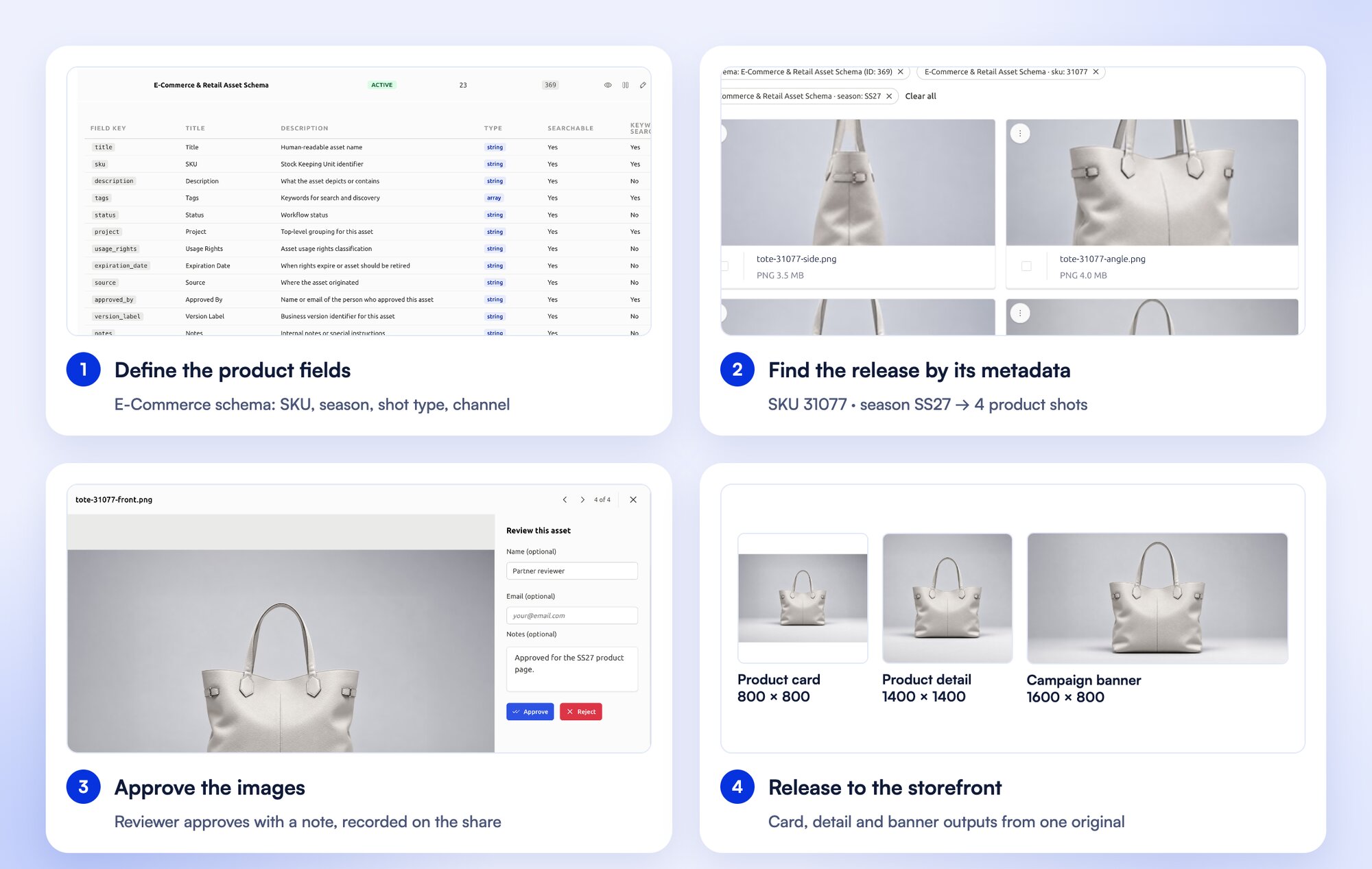
Product images need SKU, colour and season. Event media needs session, speaker and sponsor. FileSpin’s assignable schemas keep both in one library, and search combines keywords, field filters, OCR and face search. Collections group assets for a campaign without duplicating originals.
Acquia DAM offers metadata schemas, controlled vocabularies, categories and faceted search, with natural-language search and version control.
Product content and the PIM boundary
FileSpin holds product metadata on each asset and works alongside your PIM, linked to each product by its ID. Your PIM keeps descriptions, specifications and channel data, while FileSpin prepares and delivers the approved media.
Acquia offers Entries for managing product content and Syndicate for distribution, as add-ons to Acquia DAM.
Explore FileSpin for eCommerce and retail →
Renditions, image delivery and video
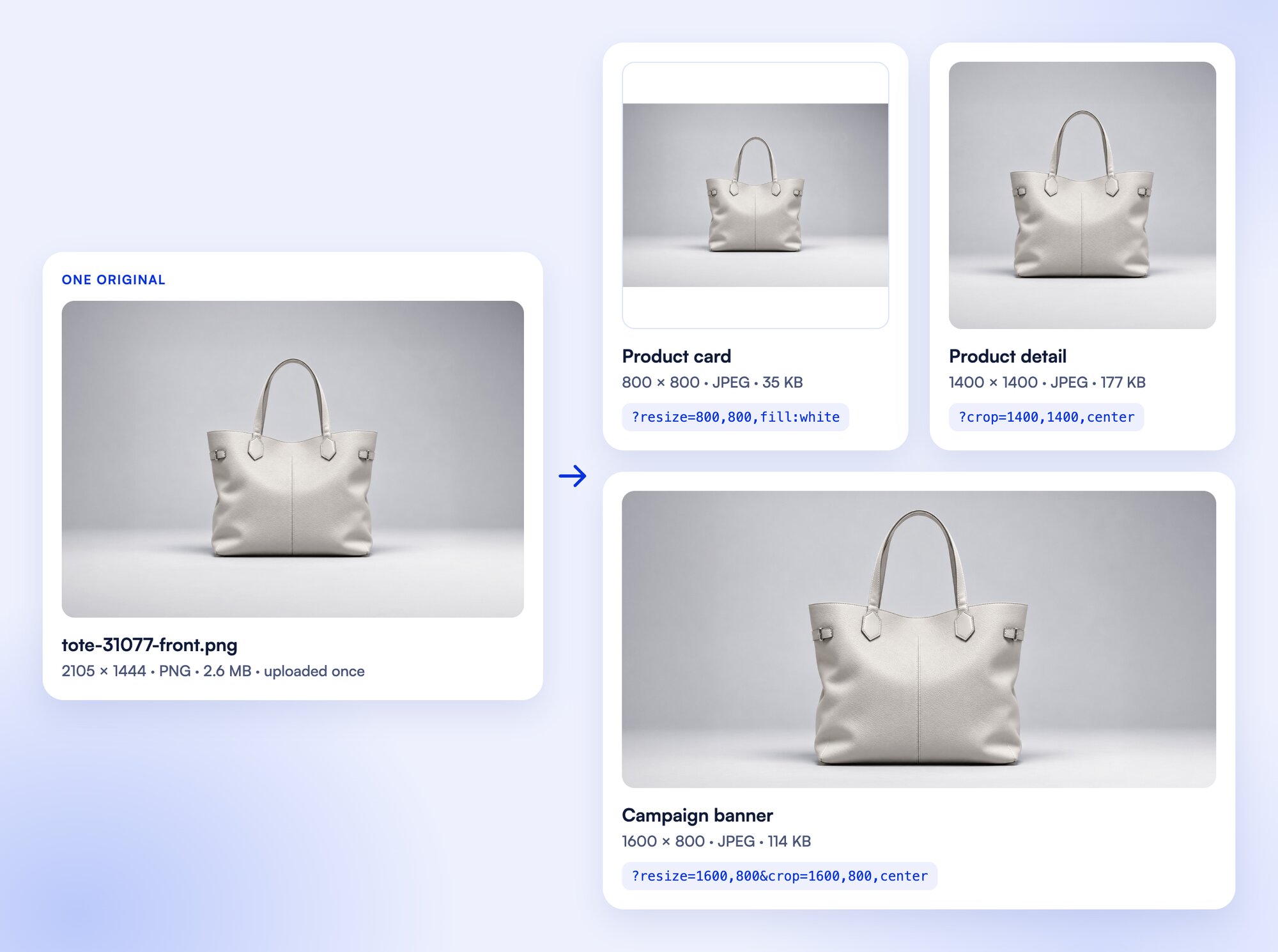
Turn one product photograph into a catalogue card, a detail view and a campaign banner through URL transformations, while the original stays in your library. Background removal, ghost mannequin and saved AI edit sequences prepare catalogue images before review, and recordings become SD and HD versions, adaptive HLS streams, clips and storyboards.
Acquia DAM converts images and video to set sizes, formats and bitrates, and delivers them through dynamic embeds and a global CDN.
Prepare product photos for your storefront
Clean up product photos with background removal, then create the sizes and formats your storefront needs from the same original.
Keep feedback and approval beside the asset
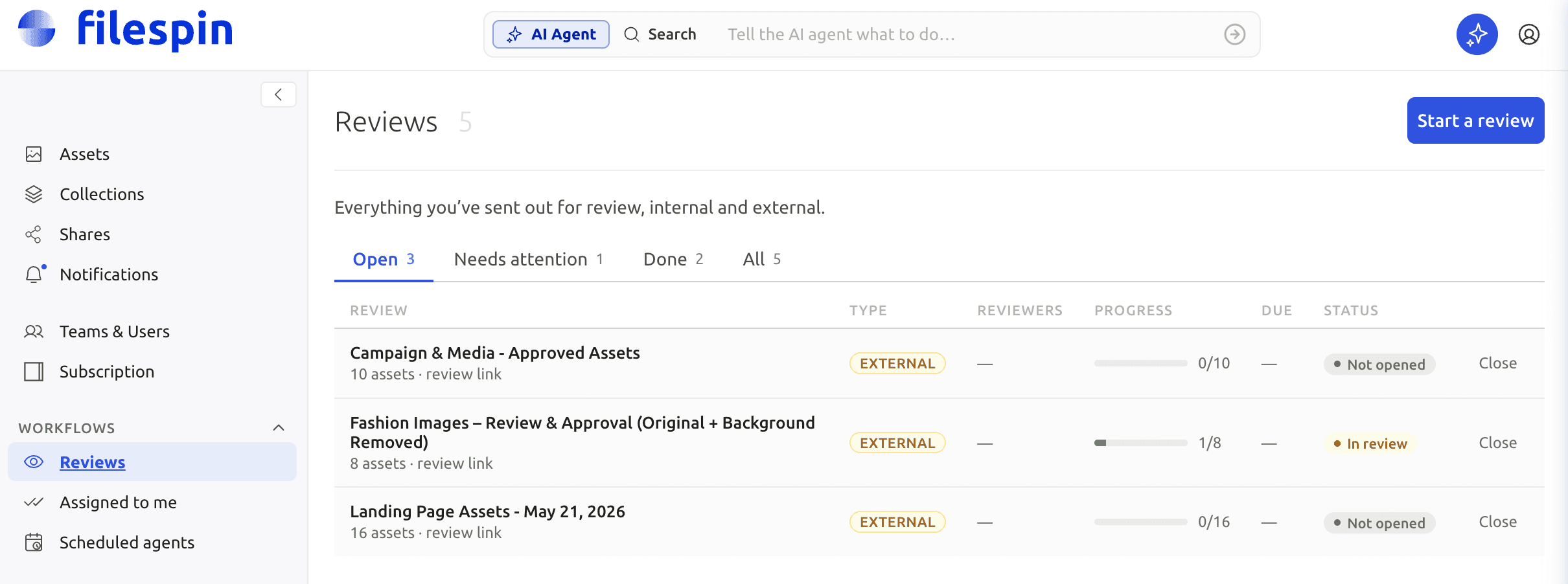
Send an image or clip for internal or external review, collect comments and approve or reject it, with due dates and progress beside the asset.
Acquia’s Workflow add-on adds online proofing, multi-stage approvals and review deadlines to the DAM.
Build an approved campaign asset pack
Gather campaign assets into a collection, get them approved and hand the finished pack to the people who need it.
Control access, sharing and your originals
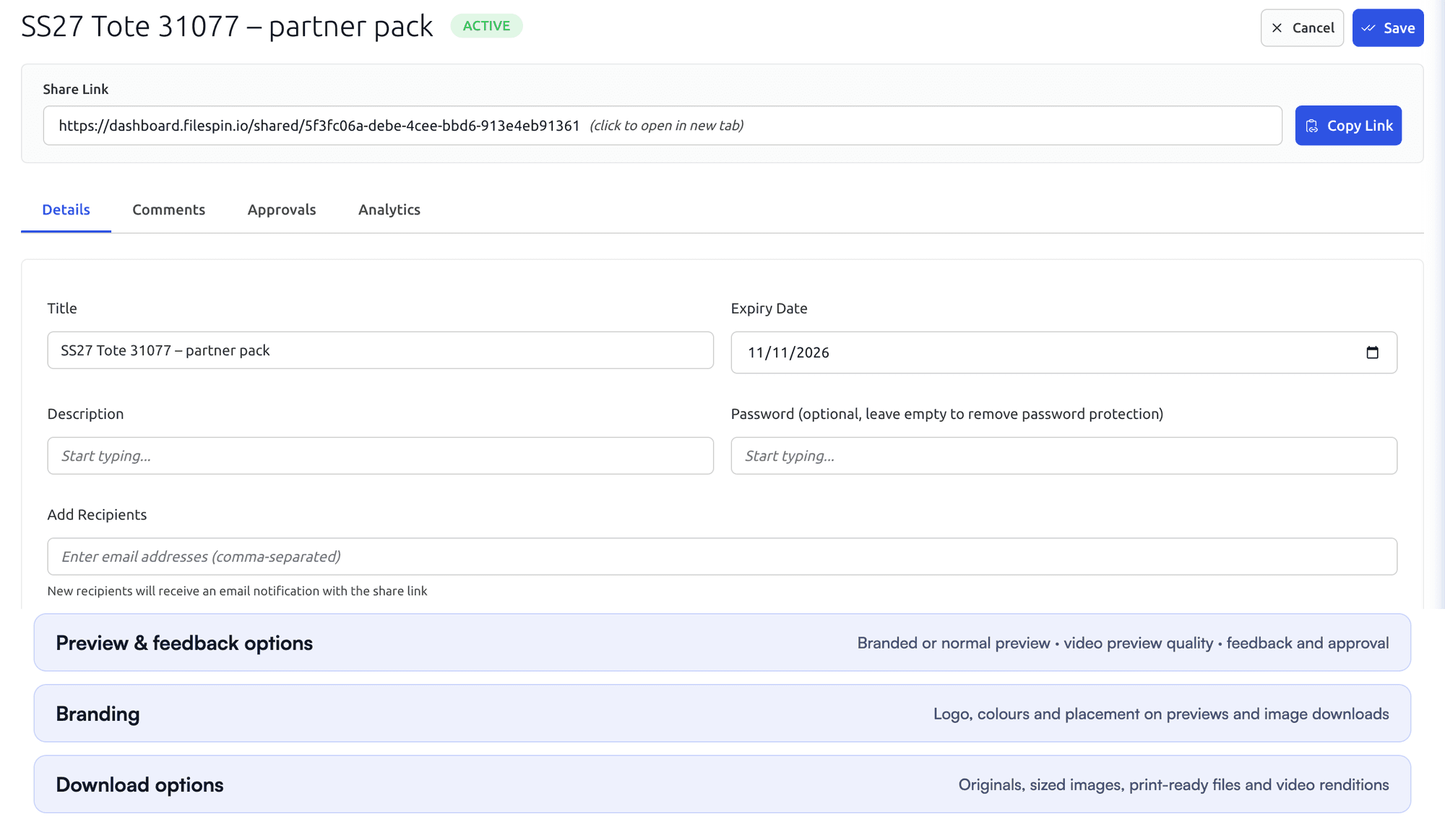
Set team roles, and give each share its own expiry, password, recipients and download options. On Scale and Enterprise, FileSpin can keep originals and renditions in your own AWS S3 bucket.
Acquia DAM controls access through role-based permissions and asset groups, with release and expiry dates on assets.

Automate recurring work and stay in control
Do day-to-day work from Dashboard menus and APIs. When you want help, ask the AI Agent to find assets, update metadata, prepare images and create shares, or connect Claude or ChatGPT through the MCP Connector. Scheduled Agents run recurring work, such as tagging a collection on a schedule.
Agent activity records every operation, and per-user credit limits keep usage in check. You can undo tagging and metadata changes. The Adobe panel and Make, Zapier and n8n integrations connect FileSpin to the tools you already use.
Acquia DAM offers AI tagging, facial recognition and an AI assistant in Workflow, and its MCP server lets AI assistants search assets and update metadata.
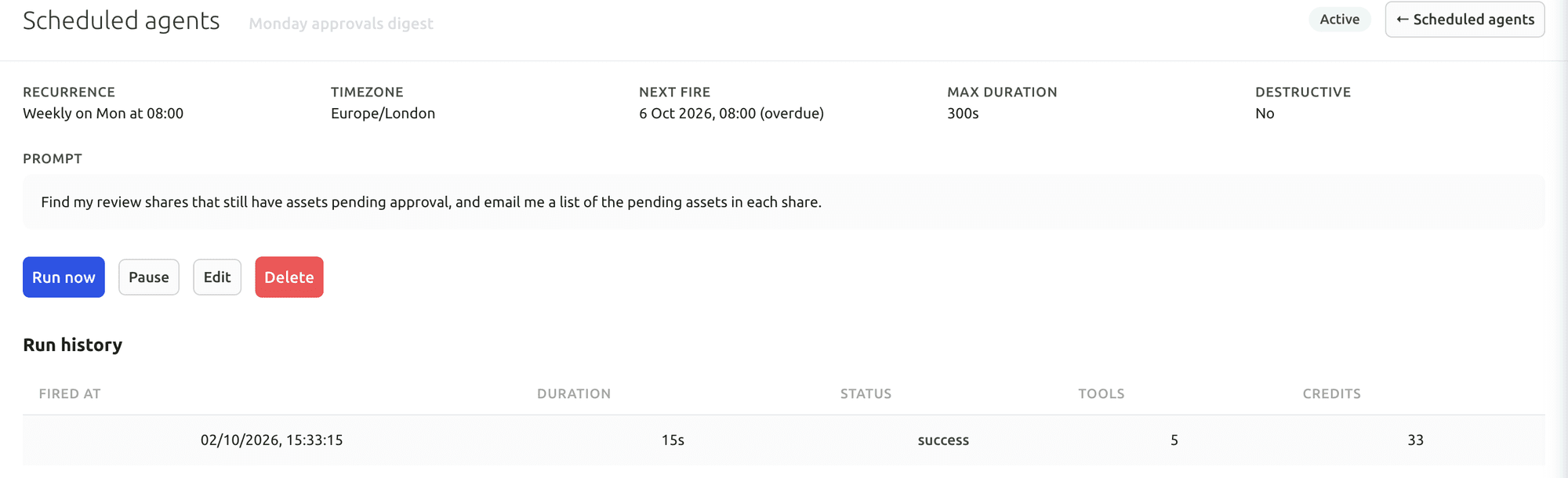
Your first useful task with the Dashboard AI Agent
Give the Dashboard AI Agent a plain-language request, watch it find the assets and carry out the task, then check the result in the library.
Connect Claude or ChatGPT through the MCP Connector
Connect an AI assistant to your FileSpin account, then search assets, update metadata and create shares from the chat, under your own permissions.
Explore the AI Agent and MCP tools →
Connect campaign delivery with operational insights
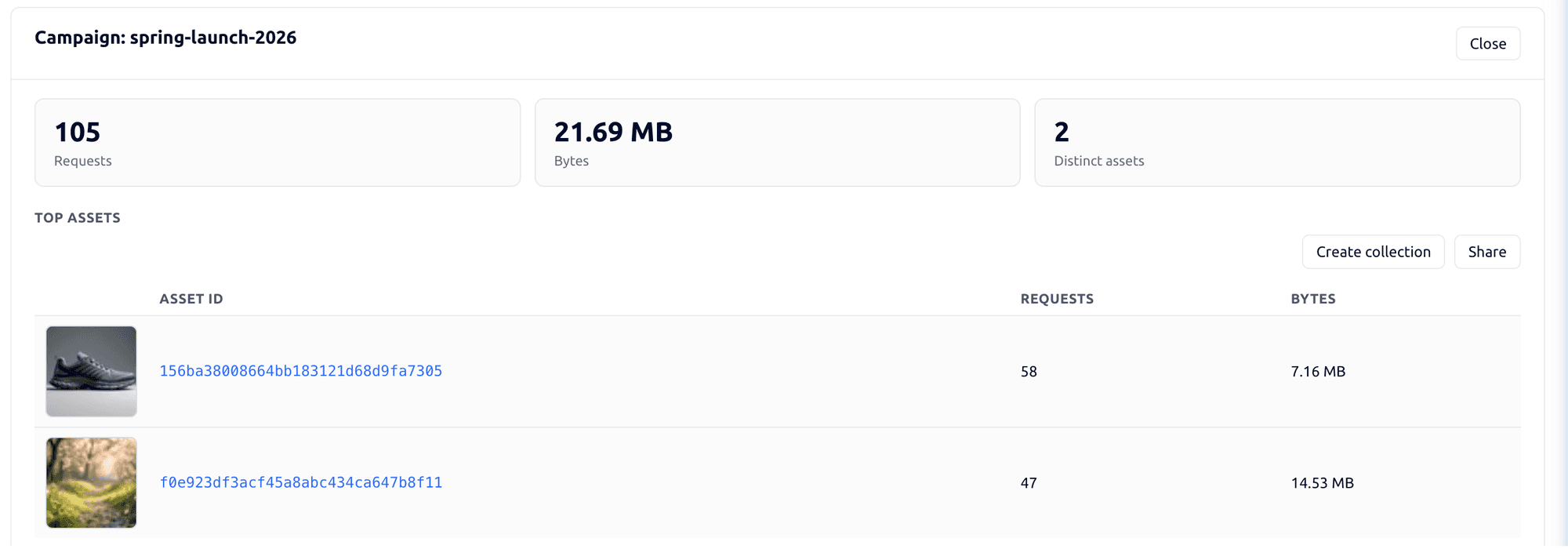
Tag campaign links by channel, placement and audience, then see the requests, bytes and assets delivered under each campaign. Share analytics shows which partner downloaded which file and output. Usage shows storage, API requests, delivery and AI credits by user and period.
Acquia DAM Insights reports asset views, downloads, searches, shares and embeds, with CSV exports and an Insights API for BI tools.

Explore the FileSpin platform →
Pricing, modules and implementation effort
Acquia’s current offer uses Workgroup, Mid-Market and Enterprise tiers with annual subscriptions and upfront implementation. Workflow, Entries, Templates and Portals+ are among the separately described add‑ons.
FileSpin publishes its subscription pricing, covering contributors, storage, image and video processing, delivery and the AI usage you choose. Customer-owned S3 storage is available on Scale and Enterprise, and Teleport on Enterprise.
Move from Acquia DAM with the right team behind you
Metadata types, controlled values and categories map to FileSpin schemas, collections are rebuilt with the same membership, and source IDs are kept so product records still find their media. Embed links are mapped to FileSpin delivery links before cutover.
Separate asset exports from Entries product records, portal designs, Drupal integrations, workflow history and syndication configurations. Map controlled vocabulary and field types carefully, and inventory dynamic embed URLs before changing delivery.
Migration starts with a representative collection: originals and metadata are exported, fields and relationships mapped, and the import checked for search, review, permissions and delivery. Old-to-new asset IDs and URLs are recorded so every application reference moves cleanly, and the source stays available until you sign off.
Generate an authorised Acquia DAM API user token and use the recommended V2 API to search and retrieve assets. The source offers paginated/search-scroll inventory and asset download links, alongside CSV metadata exports. Download access depends on original-format and asset-status permissions, including released, expired and unreleased assets. Export metadata types and controlled values with the asset records; embedded file metadata alone is not the complete DAM record.