Compare FileSpin

FileSpin vs ImageKit: from delivery optimisation to media operations

ImageKit combines image and video delivery with a DAM and developer tools. If your team also needs formal sign-off, print-ready files or originals in your own S3 bucket, consider FileSpin.

FileSpin keeps originals, preparation, review and delivery in one library, with campaign and usage insights alongside. Optional AI Agents and Scheduled Agents take on routine work within per-user budgets.

By FileSpin · Updated 15 October 2026

Should you shortlist FileSpin?

Shortlist FileSpin when:

  • Assets need formal review, with approve or reject decisions, before they reach a channel or partner.
  • You send print-ready CMYK files and web outputs from the same library, and want to see which partner downloaded what.
  • You want your own AWS S3 bucket as the primary store for originals and renditions, on Scale and Enterprise.

ImageKit may fit better when:

  • Your media is mainly a feature of a website or app, and you want URL-based transformations, including AI edits, delivered through its CDN.
  • Its DAM, delivery APIs and transformation tools already cover your workflow and storage model.

What to test before you decide:

  • Take one product release from upload through sign-off to the sizes each channel needs.
  • Check a sample of your ImageKit image URLs through FileSpin before switching traffic.
  • Send print-ready files on a share, then check what the recipient downloaded.
Book a demo →

FileSpin and ImageKit at a glance


Buying decisionFileSpinImageKit
Image transformations and deliveryFileSpin: URL resize, crop, padding and modern formats; background removal, ghost mannequin and reusable AI editsImageKit: URL transformations and CDN delivery, with AI edits such as background removal and generative fill
VideoFileSpin: Transcoding, adaptive HLS, clips, posters and storyboardsImageKit: Video API with HLS and DASH adaptive streaming
Metadata and searchFileSpin: Reusable asset schemas, full-text and faceted search, versions and relationshipsImageKit: Typed custom metadata, advanced search and versioning
Review and sharingFileSpin: Reviews with approve or reject decisions; branded share pages and print-ready CMYK exportsImageKit: Comment threads on assets; shared collections and public links
Storage ownershipFileSpin: FileSpin storage, or your own AWS S3 for originals and renditions on Scale and EnterpriseImageKit: ImageKit storage with optional backup to your S3 bucket; external storage as a delivery origin
APIs and integrationsFileSpin: APIs, webhooks, Make, Zapier and n8n; Adobe panelImageKit: APIs, SDKs, webhooks and platform integrations such as Shopify
Optional AIFileSpin: Dashboard AI Agent, Scheduled Agents and MCP tools, with activity records and per-user credit limitsImageKit: AI tagging, and DAM and Admin MCP servers scoped to each user’s permissions
InsightsFileSpin: Campaign delivery, share downloads, operational usage and AI creditsImageKit: Usage analytics by bandwidth, requests, cache, country and referrer
PricingFileSpin: Published plans from $5 a month; Enterprise by agreementImageKit: Published Free, Lite and Pro plans; Enterprise by quote
MigrationFileSpin: Supported ImageKit image URLs keep working after a hostname change; assisted or managed library migrationImageKit: DAM APIs list files, metadata and versions for export

ImageKit details are taken from ImageKit’s public product pages and documentation, checked 15 October 2026.

See the workflow

Take a product release from one library: search by SKU, prepare image variants, collect sign-off, deliver at set sizes, then replace the original in place when the next shot arrives. Product records, approvals and delivery links stay in one library.

ImageKit covers search, transformations and delivery for the same assets through its DAM and URL API.
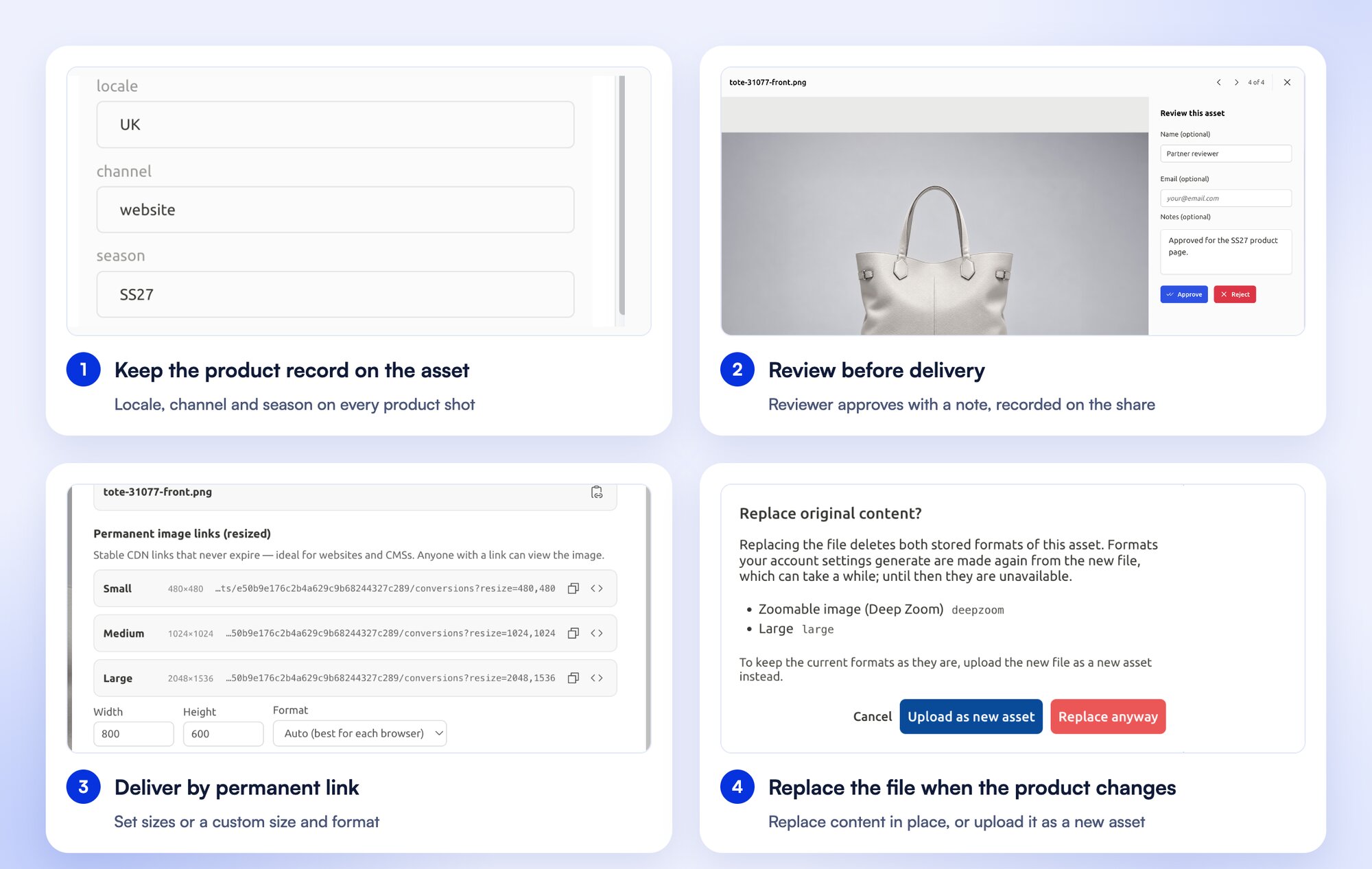
Four steps in FileSpin with one product: locale, channel and season fields on the asset, a reviewer approving the image with a note, permanent CDN links at set sizes, and the Replace original content dialog with the choice to replace in place or upload as a new asset
A product record through review, delivery and a replacement.

Explore FileSpin for eCommerce and retail →

Give search and AI Agents the right business context

FileSpin schemas define the fields, validation and search settings for each kind of asset: SKU, market and campaign for product media, or session and speaker for event content. Consistent values help people find the intended asset, and give the AI Agent the context to find images for a SKU and market, then prepare the required outputs.

ImageKit supports typed custom metadata fields, with validation and search filters on each field.

Explore asset organisation →

Review, share and print from one library

Assign reviews with due dates and approve or reject decisions, then deliver approved assets on branded share pages with their own expiry, password and download options. Export press-ready CMYK files from the same library and see which partner downloaded which output.

ImageKit offers comment threads on assets, and shares collections through user access and public links.
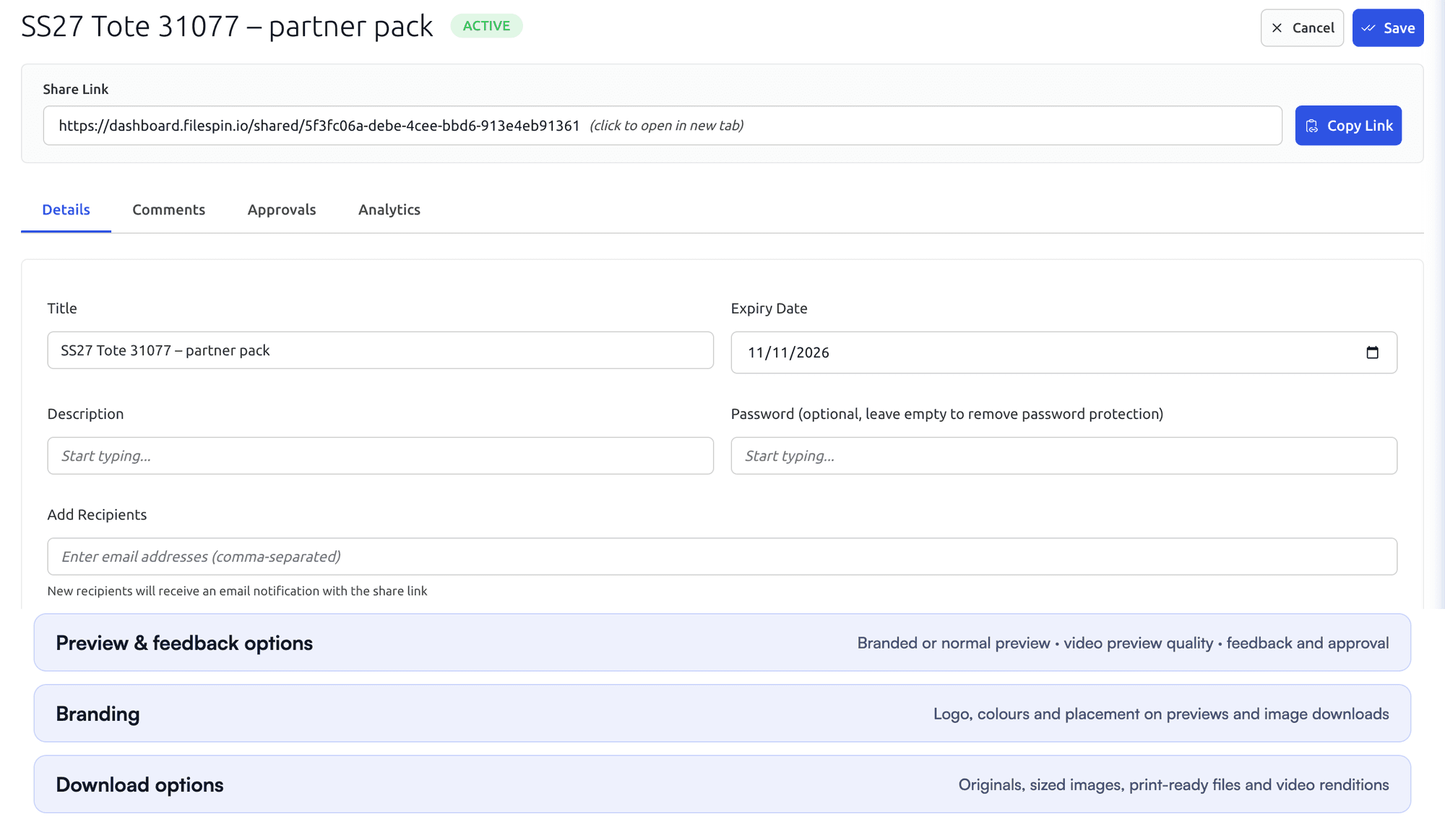
FileSpin share settings with title, expiry date, optional password and recipients, followed by the Preview and feedback options, Branding and Download options sectionsRecipient view of a FileSpin share with four product images, each with Download and Review buttons
Set a share’s expiry, review and download options, then check what the recipient sees.

Send print-ready files and reuse your share settings

Prepare print-ready files from the library, send them on a print share and save the share settings to reuse for the next handoff.

Explore review and sharing →

Automate recurring work and stay in control

Do day-to-day work from Dashboard menus and APIs. When you want help, ask the AI Agent to find assets, update metadata, prepare images and create shares, or connect Claude or ChatGPT through the MCP Connector. Scheduled Agents run recurring work, such as tagging a collection on a schedule.

Agent activity records every operation, and per-user credit limits keep usage in check. You can undo tagging and metadata changes.

ImageKit offers AI tagging and DAM and Admin MCP servers, with access scoped to each user’s role.
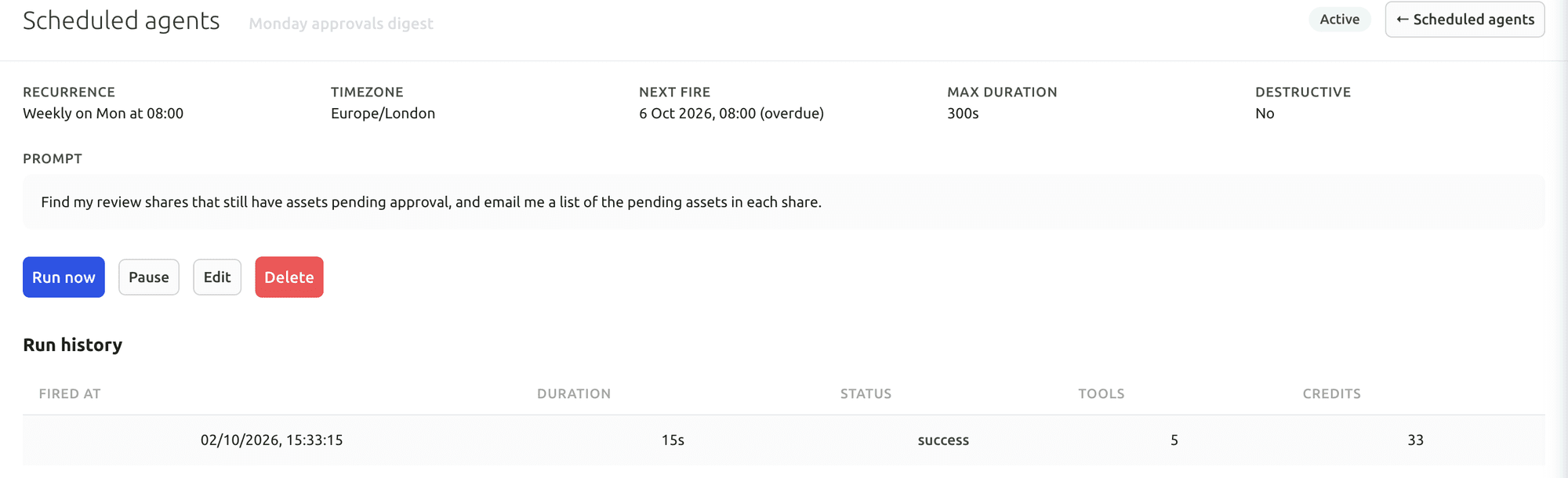
FileSpin Scheduled Agent with a weekly recurrence, time zone, next run, maximum duration, the prompt it runs and a run history showing duration, status, tools used and credits
A Scheduled Agent: its schedule, time limit and prompt, with each run’s duration, result, tools and credits.

Your first useful task with the Dashboard AI Agent

Give the Dashboard AI Agent a plain-language request, watch it find the assets and carry out the task, then check the result in the library.

Connect Claude or ChatGPT through the MCP Connector

Connect an AI assistant to your FileSpin account, then search assets, update metadata and create shares from the chat, under your own permissions.

Explore the AI Agent and MCP tools →

Connect campaign delivery with operational insights

Tag campaign links by channel, placement and audience, then see the requests, bytes and assets delivered under each campaign. Share analytics shows which partner downloaded which file and output. Usage shows storage, API requests, delivery and AI credits by user and period.

ImageKit’s usage analytics break down bandwidth, requests, cache hits, countries and referrers.
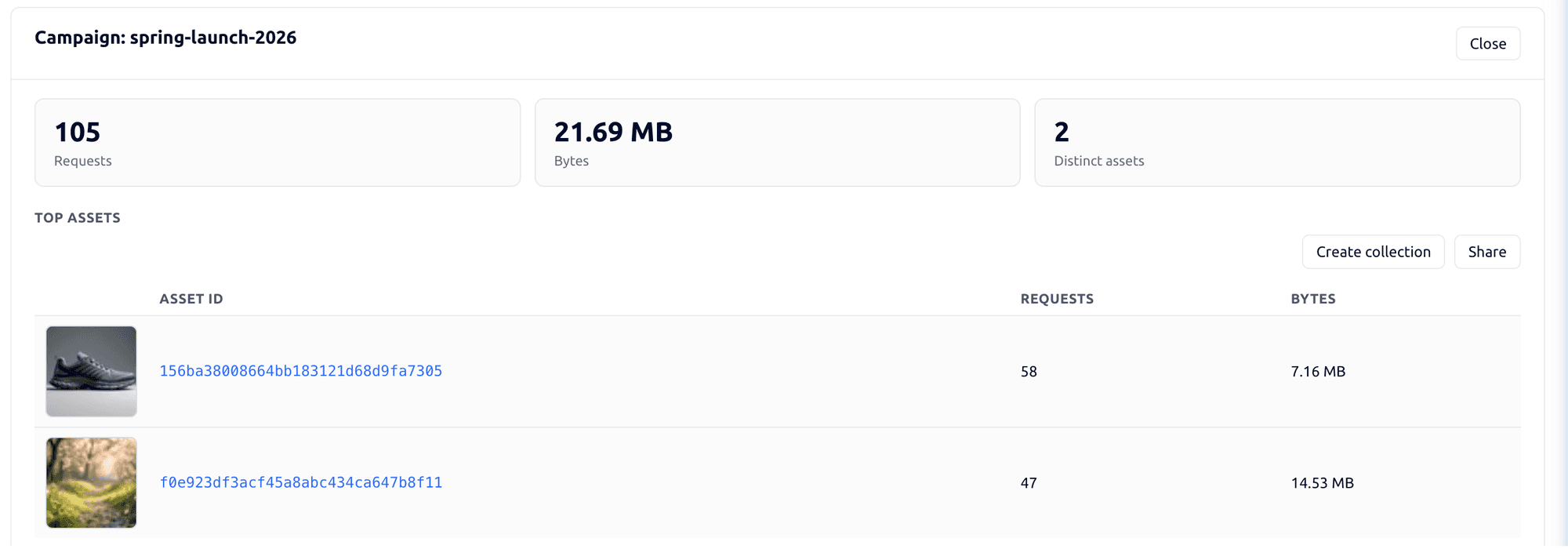
FileSpin campaign detail showing requests, bytes, distinct assets and the top delivered assets for one campaign
Requests, bytes and the assets delivered under one campaign tag.
FileSpin share analytics showing views, downloads, downloads by output type and by asset, and recent download activity
Share analytics distinguishes page views from downloads of a specific asset and output.

Explore the FileSpin platform →

Keep your image URLs when you switch

Change the delivery hostname as set up for your account and supported ImageKit image paths keep working while images copy across on demand or in bulk. You test FileSpin’s output in parallel before switching traffic, and uploads, automation and private media move as part of the planned migration.

1. Connect and check
Register the source in your enabled migration setup, verify ownership and run compatibility checks against representative image URLs. Confirm source credentials and account readiness.
2. Test the destination
Follow the configured hostname change for supported image paths. Verify both the first source-backed response and later FileSpin output, then reconcile any lazy or bulk copy before switching traffic.
3. Move the rest with a way back
Uploads, automation, metadata and private-media access rules are scoped separately: applications connect to FileSpin's APIs and events, and signed ImageKit URLs do not authorise access through FileSpin. Agree who configures the route, how cutover works and how you roll back.

Use ImageKit’s authenticated DAM APIs to enumerate files and folders with pagination. Export file IDs, file paths, tags and custom metadata, and retrieve custom-field definitions separately. List required file versions and keep their IDs in the manifest. Separate assets hosted in ImageKit from assets served from an external origin: retrieve authoritative originals from the storage system that owns them. Use authorised original downloads rather than transformed delivery responses.

Assisted migration
We provide the necessary tools to migrate assets from on-premise and cloud storage while your technical team runs the migration, including metadata mapping, import and validation.
Managed migration by FileSpin
The FileSpin team carries out the agreed migration: source extraction or export coordination, field mapping, import, validation and cutover assistance. Start by agreeing the library, integrations and history to move.

Map folders, media collections, tags and typed custom fields to FileSpin schemas and collections. Preserve the file-ID-to-path mapping and the version selected for current use.

Frequently asked questions

Is FileSpin an ImageKit alternative for our team?
Yes, especially when the work goes beyond delivery: formal reviews, print-ready exports, originals in your own S3 bucket or Teleport ingest. FileSpin brings those together with image transforms, video and CDN delivery under one permission model. Try it with your own media and see the outputs before you commit.
Will our ImageKit image URLs keep working?
Yes, for public image URLs. Change the delivery hostname as set up for your account and supported ImageKit image paths keep working while images copy across. Signed URLs, video URLs and uploads move as part of the planned migration, checked before you switch traffic.
Do we need to change our code?
Only where your application talks to ImageKit directly. Supported image paths need just the new hostname. Uploads, webhooks and other automation move to the FileSpin APIs as part of the planned migration.
Can our originals stay in our own S3 bucket?
Yes. On Scale and Enterprise, FileSpin uses your own AWS S3 bucket as the primary store for originals and renditions, not only as a backup, and you control its access policy.
Can our folders, tags and custom fields move with the assets?
Yes. Folders, collections, tags and typed custom fields map to FileSpin schemas and collections, and the file-ID-to-path mapping and current version are kept. Each batch is checked against the source before you switch.
ImageKit has AI tools and MCP too. Why FileSpin?
For agents you can leave running. Scheduled Agents run recurring work out of hours, every action by the AI Agent or a connected app is recorded in Agent activity, and per-user credit budgets and request limits keep usage in check. Supported tagging and metadata changes can be undone.
Do we need the AI Agent to get value?
No. Transforms, video, delivery, metadata, review and analytics all work without any agent. Administrators turn agents on per account when the team is ready.
Can the FileSpin team handle the migration?
Yes. With managed migration, the FileSpin team handles extraction, mapping, import, validation and cutover support. If your own team prefers to run it, assisted migration gives them the tools to migrate assets from on-premise and cloud storage.
How do we start evaluating FileSpin?
Start a 30-day free trial with your own media; no credit card needed. Or book a demo and we’ll walk through your ImageKit workflow with you.