Compare FileSpin

FileSpin vs Brandfolder

Brandfolder organises and distributes approved brand assets, with brand guidelines, templating and Smart CDN embeds. If your team also needs to prepare media for every channel, get approvals and track delivery, consider FileSpin.

FileSpin keeps originals, preparation, review and delivery in one library, with campaign and usage insights alongside. Optional AI Agents and Scheduled Agents take on routine work within per-user budgets.

By FileSpin · Updated 15 October 2026

Should you shortlist FileSpin?

Shortlist FileSpin when:

  • Approved brand assets regularly need new channel outputs, and you want sizes, formats, background removal and video outputs created from the same library you manage them in.
  • You want review, sharing and delivery reporting on the same assets, including which partner downloaded which file and output.
  • You want to work from the Dashboard and APIs, with an optional AI Agent and MCP tools under per-user budgets.

Brandfolder may fit better when:

  • Brand guidelines, templated content and curated collections for distribution are the centre of your requirements.
  • Your teams plan campaigns in Smartsheet and want to attach Brandfolder assets to sheets and rows from the same vendor.

What to test before you decide:

  • Take one approved campaign asset from upload to the outputs each channel needs.
  • Run a review with an external approver, then share the approved files and check what was downloaded.
  • Map a sample of your Brandfolder labels, custom fields and collections, and plan how Smart CDN embeds will change.
Book a demo →

FileSpin vs Brandfolder at a glance


Buying decisionFileSpinBrandfolder
Metadata and searchFileSpin: Reusable asset schemas, full-text and faceted search, OCR and face recognitionBrandfolder: Labels, custom fields, sections and collections; OCR text indexing on Premium
Image preparationFileSpin: URL resize, crop, padding and modern formats; background removal, ghost mannequin and reusable AI editsBrandfolder: Smart CDN URL resizing and format conversion; templating with Content Automation
VideoFileSpin: Transcoding, adaptive HLS, clips, posters and storyboardsBrandfolder: Video editor for clips, watermarks, formats and resolutions; Video AI on Premium
Review and sharingFileSpin: Internal and external reviews with due dates; branded share pagesBrandfolder: Proofing for images, video, documents and PDFs; curated collections
Access and storageFileSpin: Roles and expiring links; your own AWS S3 for originals and renditions on Scale and EnterpriseBrandfolder: User permission levels and publish and expiry dates; tighter permissions on Enterprise
APIs and integrationsFileSpin: APIs, webhooks, Make, Zapier and n8n; Adobe panelBrandfolder: V4 API, webhooks and integrations, including Smartsheet
Optional AIFileSpin: Dashboard AI Agent, Scheduled Agents and MCP tools, with activity records and per-user credit limitsBrandfolder: Brand Intelligence tagging and Video AI; Custom Automation on Enterprise
InsightsFileSpin: Campaign delivery, share downloads, operational usage and AI creditsBrandfolder: Asset analytics and Smart CDN usage tracking; BI data connector on Enterprise
PricingFileSpin: Published plans from $5 a month; Enterprise by agreementBrandfolder: Premium and Enterprise plans, priced on request
MigrationFileSpin: Assisted migration with our tools, or managed migration by FileSpinBrandfolder: V4 API retrieval of assets, attachments and metadata

Brandfolder details are taken from Brandfolder’s public product pages and documentation, checked 15 October 2026.

Asset organisation, metadata and discovery

Product images need SKU, colour and season. Event media needs session, speaker and sponsor. FileSpin’s assignable schemas keep both in one library, and search combines keywords, field filters, OCR and face search. Collections group assets for a campaign without duplicating originals.

Brandfolder organises assets with labels, custom fields, sections and collections, and one asset can hold several file attachments.
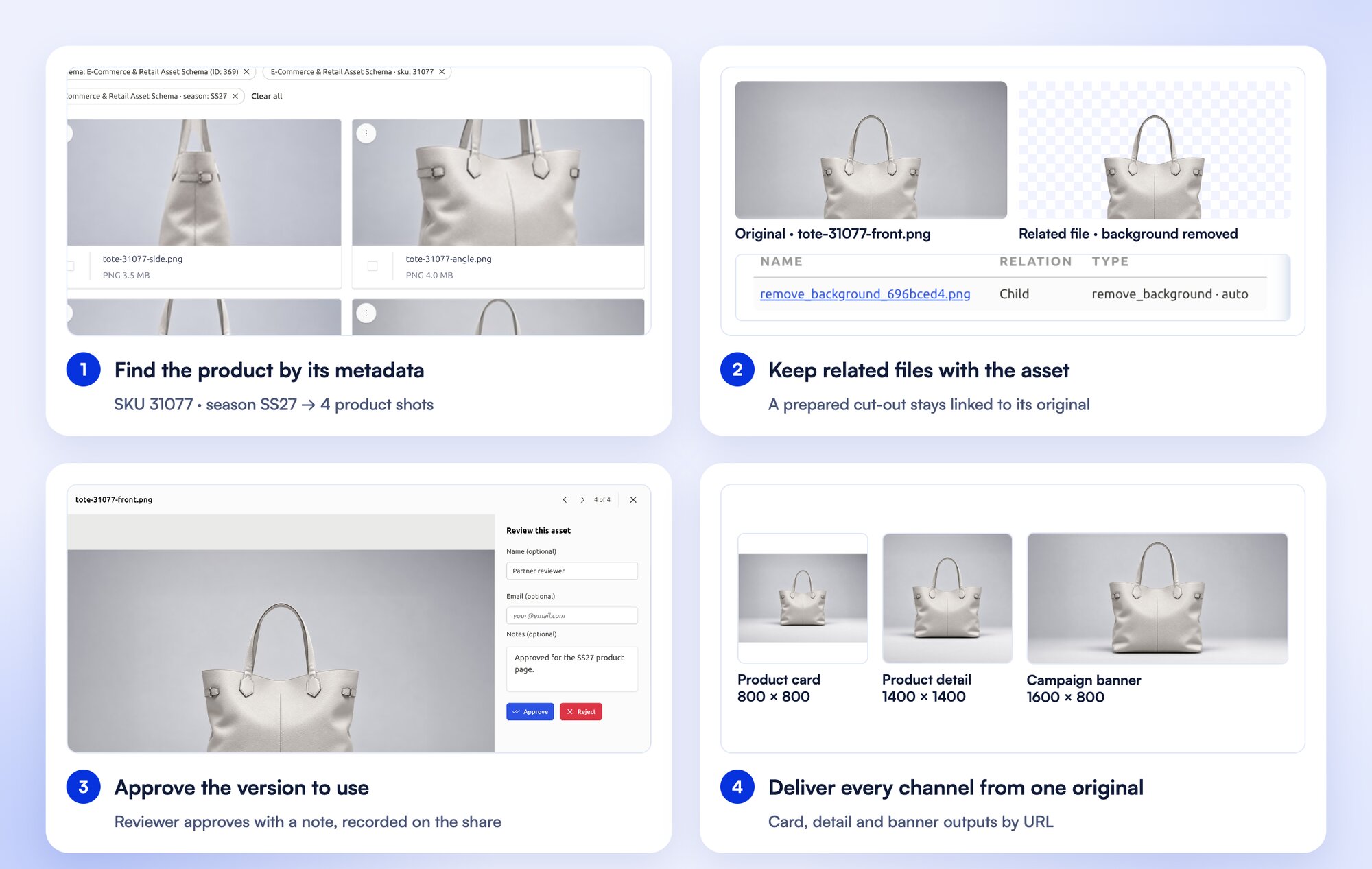
Four steps in FileSpin with one product: a search by SKU 31077 and season SS27, the original beside its linked background-removed file, a reviewer approving the image with a note, and card, detail and banner outputs from the same original
One product asset from searchable metadata to approved channel outputs.

Explore asset organisation →

Image transformations, video and delivery

Turn one product photograph into a catalogue card, a detail view and a campaign banner through URL transformations, while the original stays in your library. Background removal, ghost mannequin and saved AI edit sequences prepare catalogue images before review, and recordings become SD and HD versions, adaptive HLS streams, clips and storyboards.

Brandfolder’s Smart CDN resizes and converts images by URL and updates embedded assets centrally, and its video editor creates clips, watermarked versions and new formats.
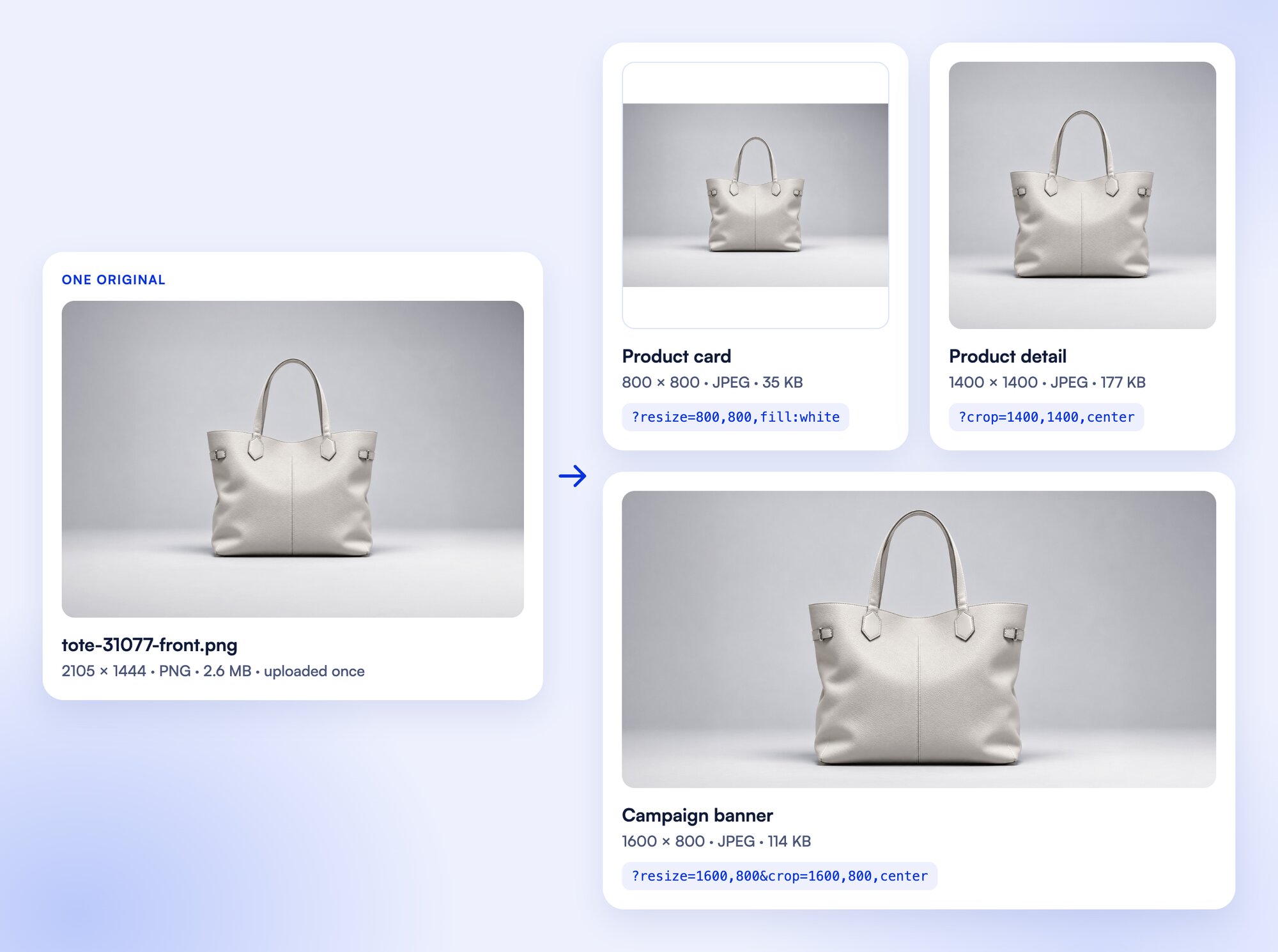
One 2105×1444 product original delivered as an 800×800 padded product card, a 1400×1400 detail crop and a 1600×800 campaign banner through FileSpin URL transformations
Real FileSpin outputs from one 2105×1444 PNG original, with the URL parameters for each. Each output is the same size as the source or smaller.

Prepare product photos for your storefront

Clean up product photos with background removal, then create the sizes and formats your storefront needs from the same original.

Explore image preparation →

Reviews, versions and collaboration

Send an image or clip for internal or external review, collect comments and approve or reject it, with due dates and progress beside the asset.

Brandfolder proofing covers review, edits and approval for images, video, documents and PDFs.
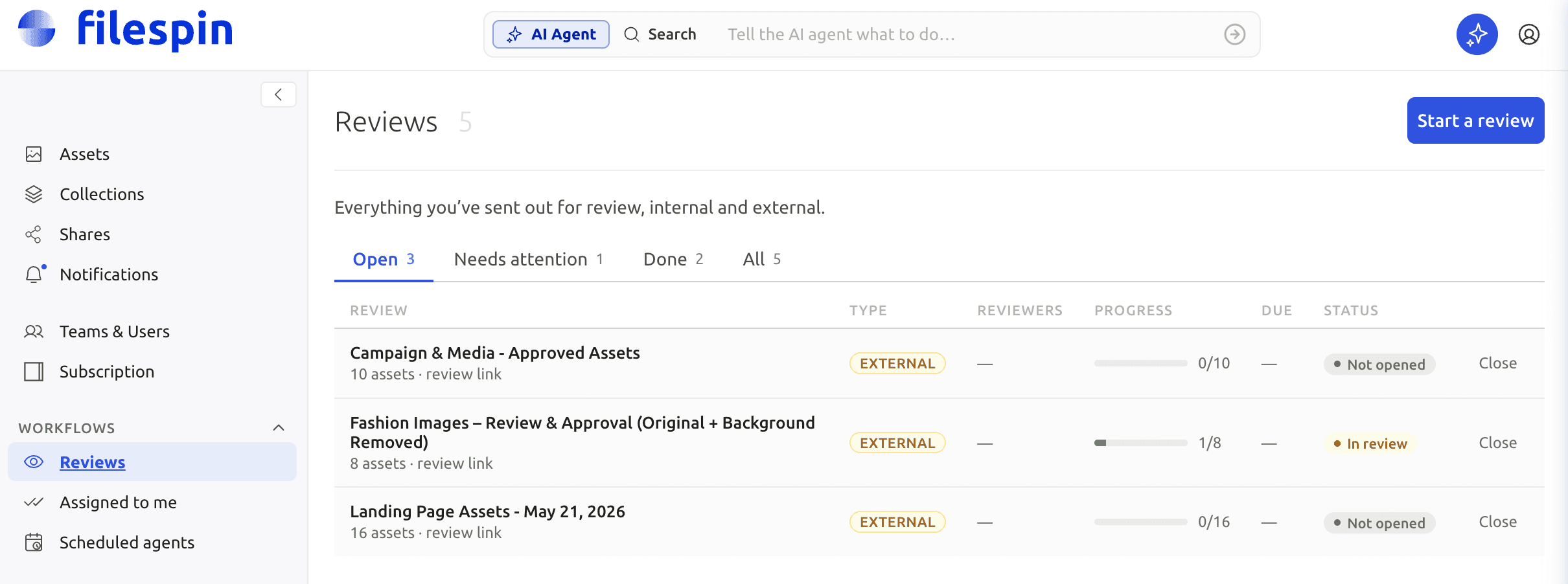
FileSpin Reviews showing due dates, status and progress.
FileSpin Reviews: track assignments and decisions alongside the asset library.

Build an approved campaign asset pack

Gather campaign assets into a collection, get them approved and hand the finished pack to the people who need it.

Explore review and sharing →

Control access, sharing and your originals

Set team roles, and give each share its own expiry, password, recipients and download options. On Scale and Enterprise, FileSpin can keep originals and renditions in your own AWS S3 bucket.

Brandfolder Collections curate assets for particular audiences, with publish and expiry dates on Premium and tighter permissions on Enterprise.
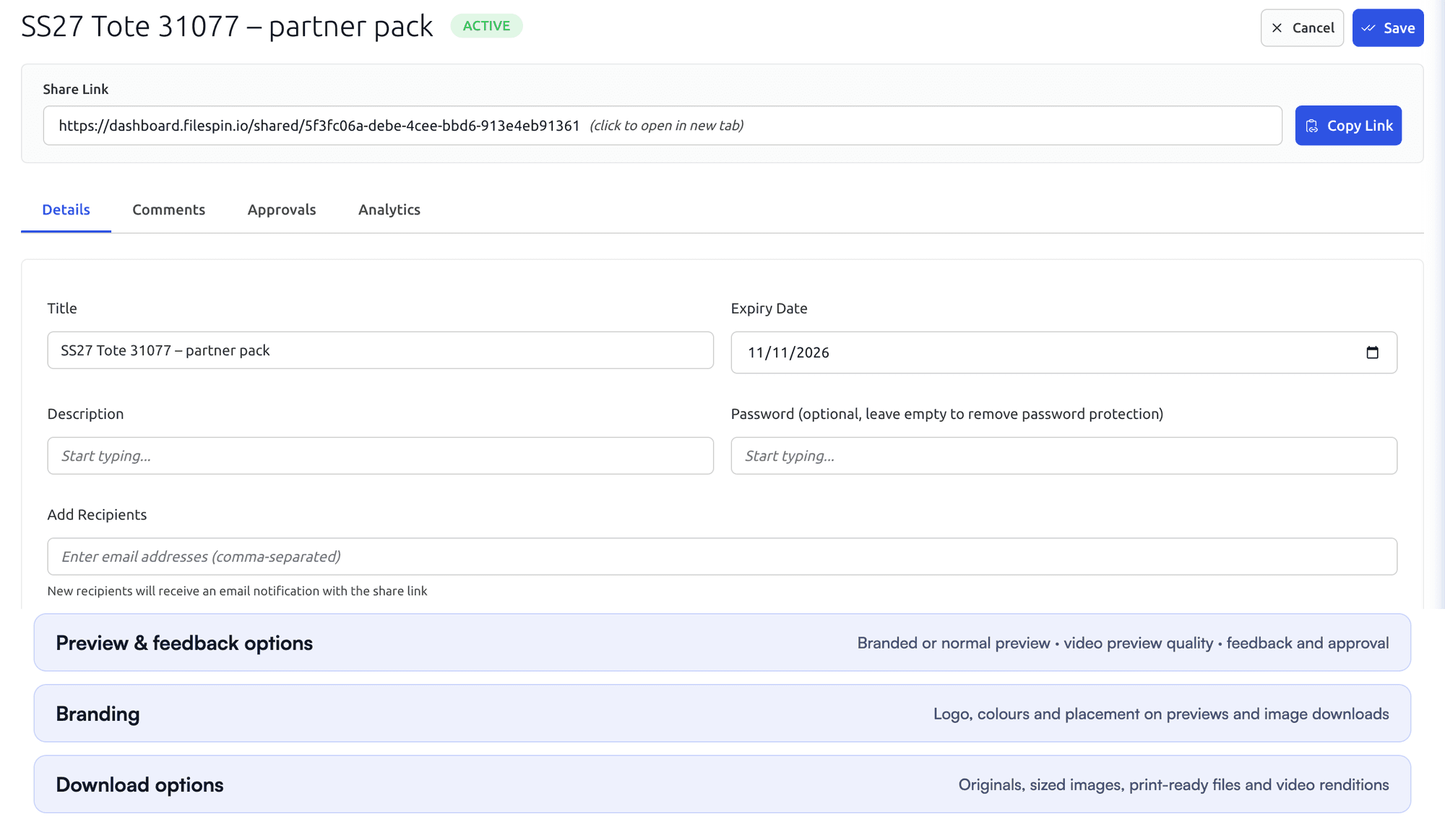
FileSpin share settings with title, expiry date, optional password and recipients, followed by the Preview and feedback options, Branding and Download options sectionsRecipient view of a FileSpin share with four product images, each with Download and Review buttons
Set a share’s expiry, review and download options, then check what the recipient sees.

See how we handle security →

Automate recurring work and stay in control

Do day-to-day work from Dashboard menus and APIs. When you want help, ask the AI Agent to find assets, update metadata, prepare images and create shares, or connect Claude or ChatGPT through the MCP Connector. Scheduled Agents run recurring work, such as tagging a collection on a schedule.

Agent activity records every operation, and per-user credit limits keep usage in check. You can undo tagging and metadata changes. The Adobe panel and Make, Zapier and n8n integrations connect FileSpin to the tools you already use.

Brandfolder offers Brand Intelligence tagging and Video AI, with Custom Automation on its Enterprise plan.
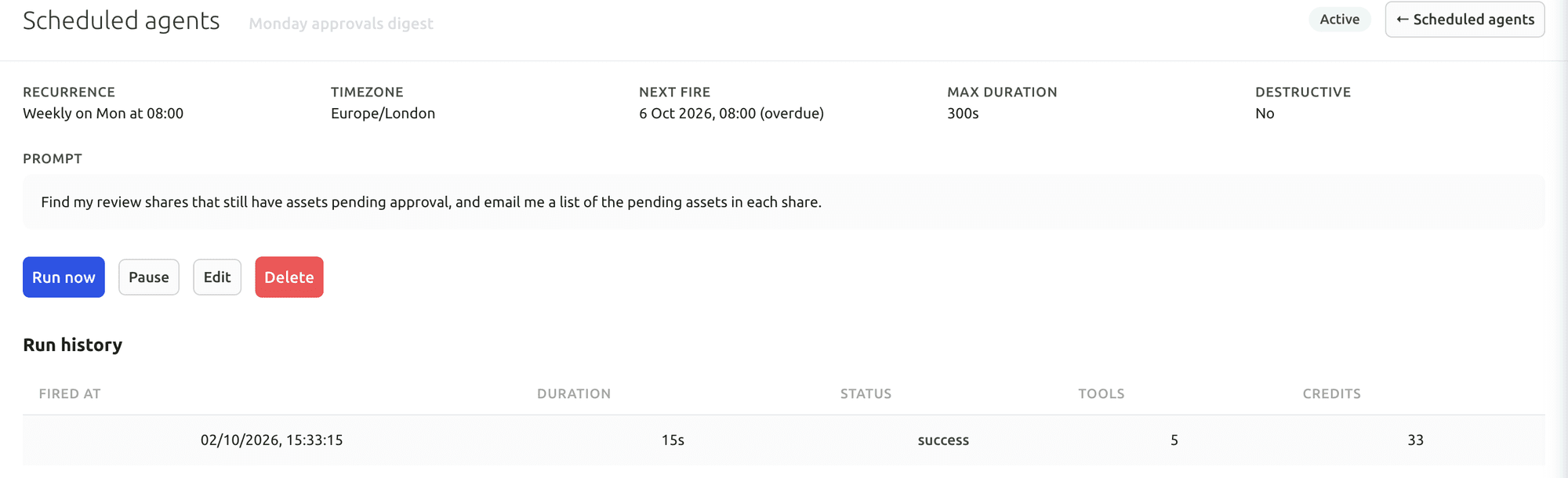
FileSpin Scheduled Agent with a weekly recurrence, time zone, next run, maximum duration, the prompt it runs and a run history showing duration, status, tools used and credits
A Scheduled Agent: its schedule, time limit and prompt, with each run’s duration, result, tools and credits.

Your first useful task with the Dashboard AI Agent

Give the Dashboard AI Agent a plain-language request, watch it find the assets and carry out the task, then check the result in the library.

Connect Claude or ChatGPT through the MCP Connector

Connect an AI assistant to your FileSpin account, then search assets, update metadata and create shares from the chat, under your own permissions.

Explore the AI Agent and MCP tools →

Connect campaign delivery with operational insights

Tag campaign links by channel, placement and audience, then see the requests, bytes and assets delivered under each campaign. Share analytics shows which partner downloaded which file and output. Usage shows storage, API requests, delivery and AI credits by user and period.

Brandfolder offers asset analytics and Smart CDN usage tracking, with a data connector for BI tools on Enterprise.
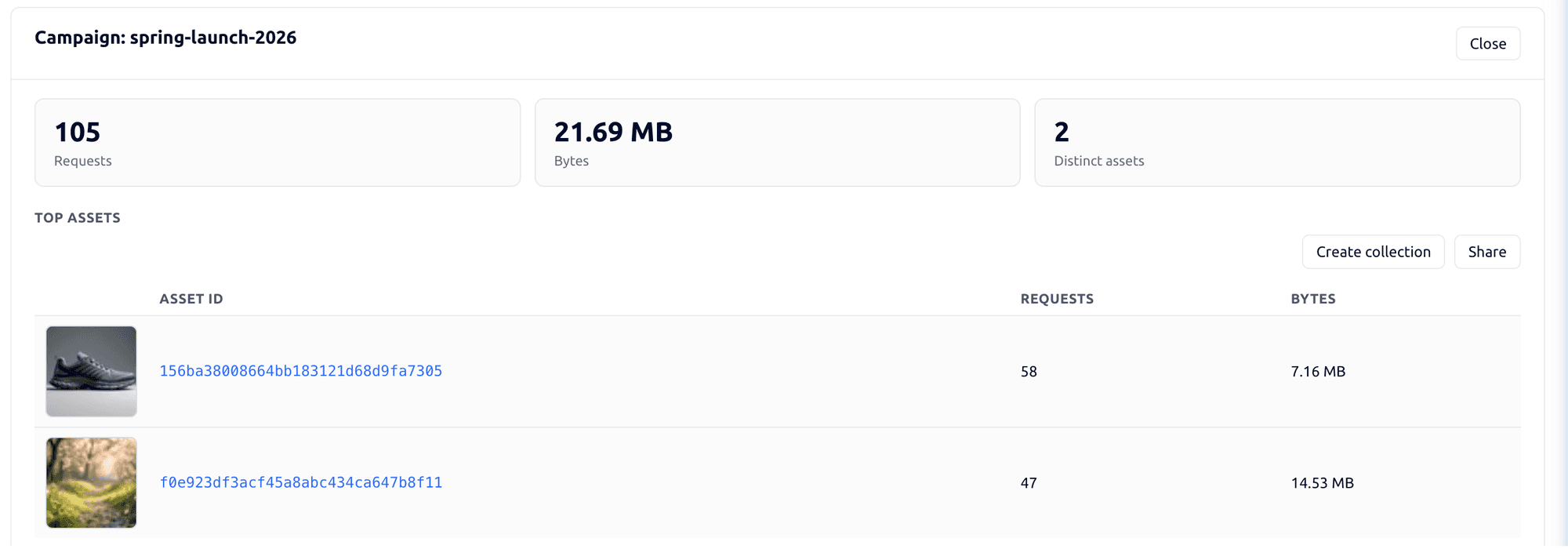
FileSpin campaign detail showing requests, bytes, distinct assets and the top delivered assets for one campaign
Requests, bytes and the assets delivered under one campaign tag.
FileSpin share analytics showing views, downloads, downloads by output type and by asset, and recent download activity
Share analytics distinguishes page views from downloads of a specific asset and output.

Explore the FileSpin platform →

Pricing, add‑ons and evaluation costs

Brandfolder’s current pricing page distinguishes Premium and Enterprise and requests a tailored quote. It lists differences such as automation and organisational controls.

FileSpin publishes its subscription pricing, covering contributors, storage, image and video processing, delivery and the AI usage you choose. Customer-owned S3 storage is available on Scale and Enterprise, and Teleport on Enterprise.

Move from Brandfolder with the right team behind you

Labels, sections, custom fields and collections come across with the assets, each Brandfolder asset keeps its attachments together, and Smart CDN embeds are mapped to FileSpin delivery links before cutover.

Assisted migration
We provide the necessary tools to migrate assets from on-premise and cloud storage while your technical team runs the migration, including metadata mapping, import and validation.
Managed migration by FileSpin
The FileSpin team carries out the agreed migration: source extraction or export coordination, field mapping, import, validation and cutover assistance. Start by agreeing the library, integrations and history to move.

Map sections and labels deliberately; preserve collections as membership, not duplicate binaries. Convert string custom-field values to destination types only after validation, and retain the source asset-to-attachment relationship.

Migration starts with a representative collection: originals and metadata are exported, fields and relationships mapped, and the import checked for search, review, permissions and delivery. Old-to-new asset IDs and URLs are recorded so every application reference moves cleanly, and the source stays available until you sign off.

Replace Smart CDN embeds and collection links where they are used. Export required past versions through an agreed source route and retain proofing history separately where it is not part of the transfer.

Use the Brandfolder V4 API with a bearer API key whose user can read the required library. Enumerate assets and their attachments, keeping both identifiers: one asset can contain several files. Export tags, custom-field keys and values, sections and collection membership. Follow the endpoint’s pagination. Download each required attachment from its returned file URL and reconcile it to the parent asset.

Frequently asked questions

Is FileSpin a Brandfolder alternative for our team?
Yes, especially if your team turns brand assets into channel-ready images and video, not just distributes them. FileSpin keeps originals, metadata, reviews and delivery in one library, so an approved asset goes from upload to every size a channel needs without exporting files or switching tools. Try it with your own media and see the outputs before you commit.
Brandfolder’s Smart CDN already resizes images. What does FileSpin add?
Preparation before delivery and a review step that tracks itself. Remove backgrounds, create ghost-mannequin shots and apply reusable AI edits, assign reviews with due dates and approve or reject decisions, and turn recordings into HLS streams, clips and storyboards. Standard on-demand image sizes don’t count against storage.
Do we need developers to get started?
No. Teams upload, organise, review and share from the Dashboard. Developers use the APIs and delivery URLs only when you connect your own applications.
Can our labels, custom fields and collections move with the assets?
Yes. Labels, sections and custom fields map to FileSpin schemas, collections are rebuilt as membership rather than duplicate files, and each Brandfolder asset keeps its attachments together. Each batch is checked against the source before you switch.
Can the FileSpin team handle the migration?
Yes. With managed migration, the FileSpin team handles extraction, mapping, import, validation and cutover support. If your own team prefers to run it, assisted migration gives them the tools to migrate assets from on-premise and cloud storage.
Will our Smart CDN embeds keep working?
Your pages keep showing the right media when the switch is planned. Each Smart CDN embed and collection link is mapped to its FileSpin delivery link, connected applications are updated, and redirects are set up wherever you control the domain, all before cutover.
Can we keep originals in our own storage?
Yes. On Scale and Enterprise, FileSpin can keep your originals and renditions in your own AWS S3 bucket, so the files stay yours.
Do we need the Dashboard AI Agent or MCP tools?
No. Every workflow runs from the Dashboard and the APIs. When you want to move faster, the AI Agent finds assets, updates metadata, prepares images and creates shares from a plain-language request, and Scheduled Agents handle recurring work out of hours. Every action is recorded in Agent activity, with per-user credit budgets and request limits.
Can FileSpin track campaign delivery?
Yes. Tagged campaign links show the requests, bytes and assets delivered for each campaign and channel, and share analytics shows which files partners downloaded, by asset and output type. Storage, processing and AI usage sit in the same account, so you can see the resources behind the work.
How do we start evaluating FileSpin?
Start a 30-day free trial with your own media; no credit card needed. Or book a demo and we’ll walk through your Brandfolder workflow with you.