Migration guide
Move media from Cloudflare Images and Stream to FileSpin
Move to FileSpin with every image and video reconciled and a working delivery route. Start with a product launch: manage the original and its metadata, review it with the team, deliver image variants and video, then confirm that a replacement reaches the page.
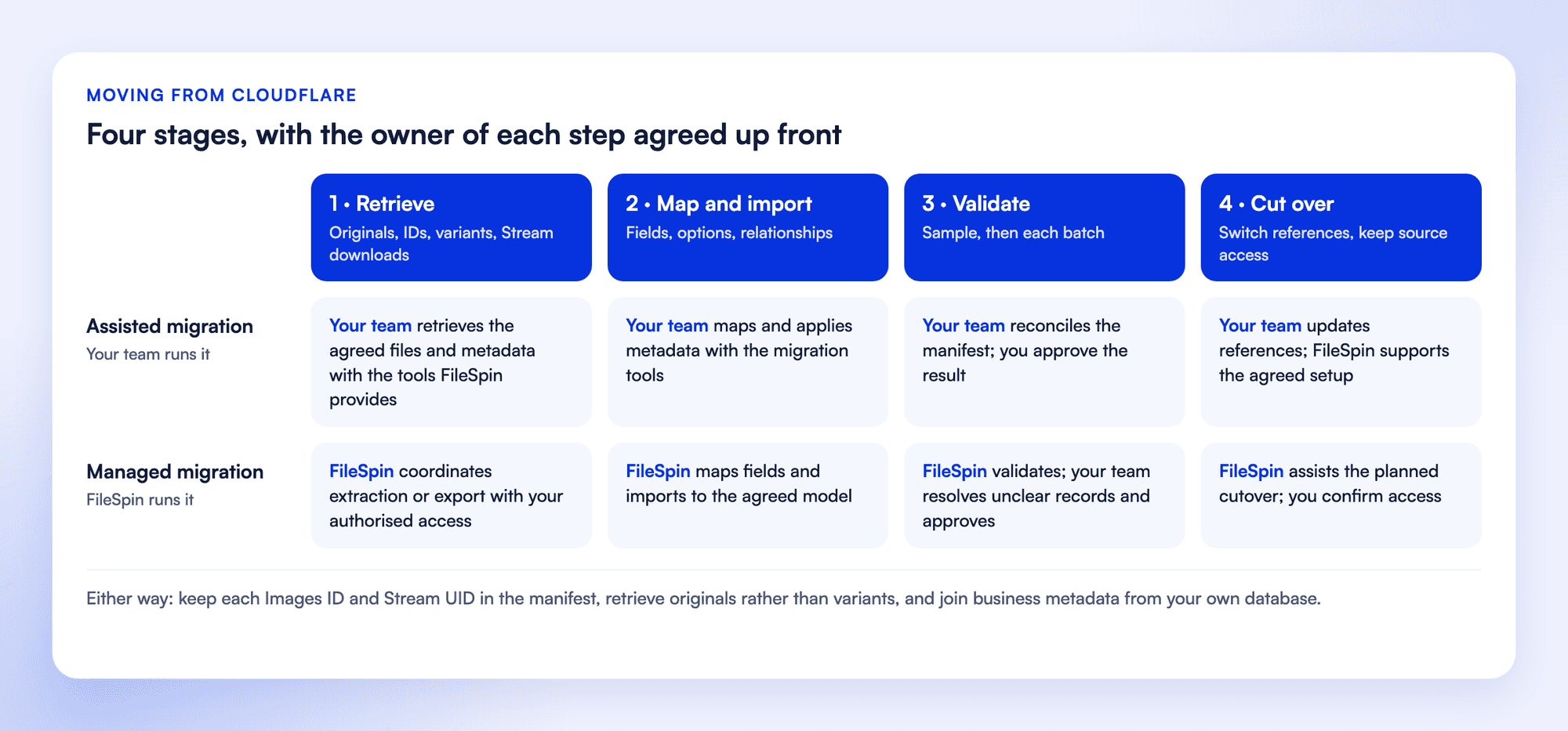
There are two ways to run the move. Both start with an inventory and a representative sample before the full transfer.
1. Retrieve the source files and records
Hosted Images, remote-origin images, R2 objects and Stream videos are inventoried separately. A read-only API token lists hosted image IDs and metadata, and each original is exported through the Images blob endpoint. Remote-origin and R2 originals are copied from that storage. Stream doesn’t return the uploaded file, so the video masters you keep are imported where you have them. Otherwise, Stream’s downloadable MP4 for each video becomes the migration file.
Retrieval uses an authorised source account, with credentials kept out of exports, screenshots and public URLs. Each completed inventory page and download is saved, so interrupted work resumes where it stopped, and expired download links are refreshed.
2. Create a manifest you can reconcile
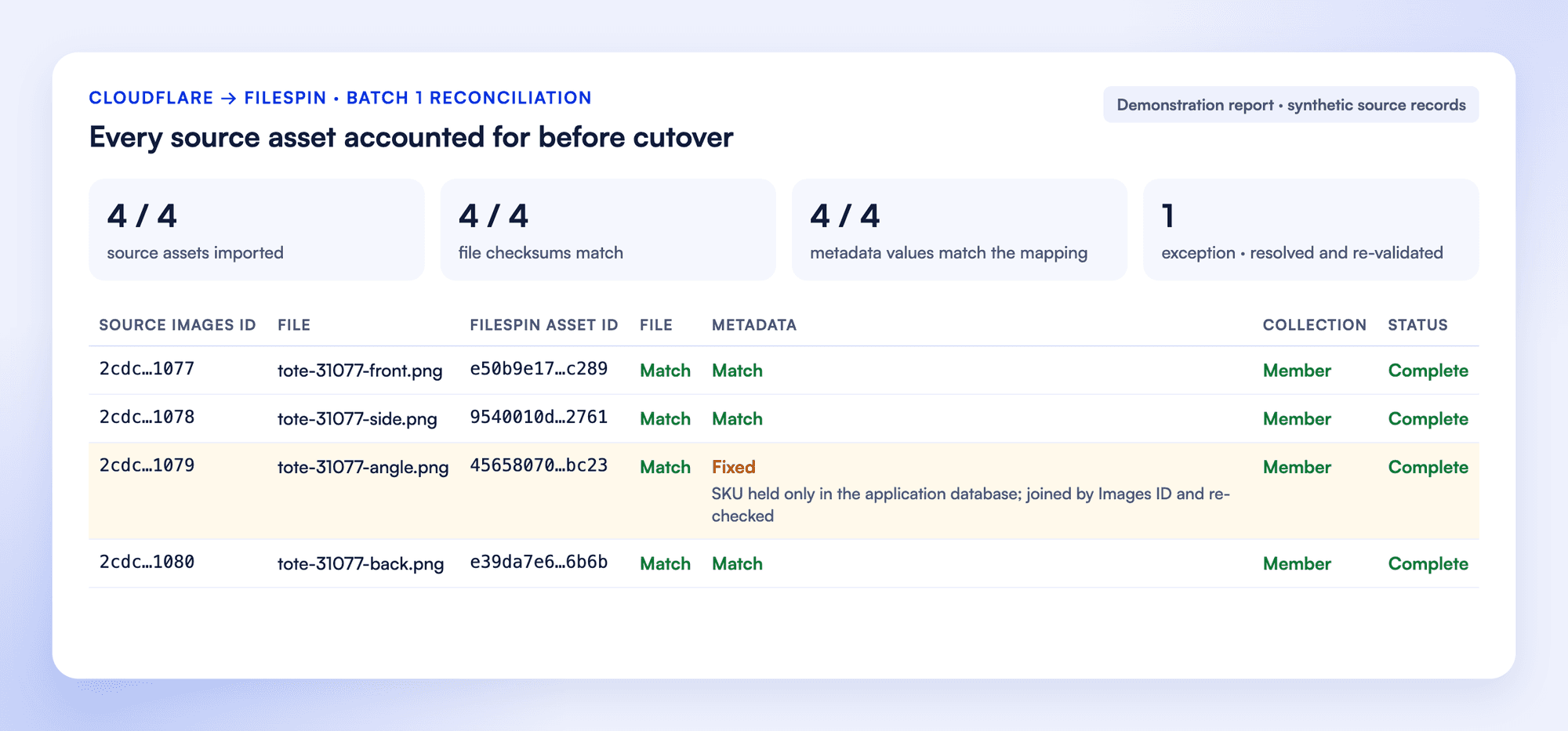
One record per source file or retained version: source system, asset ID, file or version ID, original name, source path, file type, bytes, a checksum recorded at download, tags, custom metadata, collection membership, rights information and source update time. The FileSpin asset ID and transfer status are added as work progresses.
Original files are kept separate from thumbnails and delivery renditions. Every exception, such as a missing original, a restricted download or an unsupported format, is listed with its resolution.
3. Map what moves and what gets rebuilt
Part of the library | What happens |
|---|---|
Originals | Authorised source files downloaded and reconciled against the manifest |
Metadata | Hosted image IDs and metadata map to FileSpin records. Variant definitions, source URLs and Stream video IDs are kept in the migration record, and business data from your application database maps to FileSpin schemas. |
Collections | Collections built from your business data |
Versions | The revisions you keep, retrieved alongside the current files |
Access | Roles, private delivery and review workflows set up in FileSpin |
Delivery | Image URL parameters, named variants, player embeds and signed-access rules are rebuilt for FileSpin, while Cloudflare DNS, security and unrelated Workers stay as they are. |
History | Delivery analytics stay in Cloudflare; FileSpin records delivery and share analytics from cutover |

4. Import and check a sample
The sample includes several file types, a multi-value metadata field, an asset in more than one collection, a retained revision and restricted content. Files are loaded, FileSpin IDs recorded, mapped metadata applied and relationships rebuilt.
In an assisted migration, your team stages the retrieved files with the tools we provide and loads metadata through the mapping. In a managed migration, the FileSpin team carries out these steps.
The sample passes when:
- The correct file and intended version opens in FileSpin.
- Required fields, types and controlled values match the mapping.
- Collection membership counts match and related assets resolve.
- Version records and current files match the scope.
- An authorised user gets access and an unauthorised user is refused.
- A content owner finds the selected assets by business fields and completes a review.
- Real pages, players and feeds return the intended output, including after a replacement.
- A test campaign link and a share download appear in Delivery Insights and Share analytics.
- If agent work is included, its first run touches only the selected assets, stays within budget and reports its outcome.
- Every exception is listed and resolved before the full run.
Cloudflare migration questions
Do our Cloudflare URLs keep working?
Can we keep working in Cloudflare during the migration?
Do metadata and folders come across?
Do we need to run the migration ourselves?
5. Cut over
6. Sign off the result
- Every in-scope source file has a destination ID or an accepted exception.
- Required metadata, relationships, versions and access controls pass the agreed checks.
- Applications use the intended delivery route and updates appear correctly.
- The exception report, ownership map and recovery procedure are handed over.
Plan your Cloudflare migration with FileSpin. Tell us the size of your library, the history you need and the systems it feeds, and we’ll scope an assisted or managed migration with you.