We all know how event shoots end. You’ve got three photographers, thousands of photos, and the very next morning, someone urgently needs every single picture of the keynote speaker, an award winner, a performer, or a sponsor’s CEO.
It sounds like a simple request. In reality, it means someone is stuck scrolling through contact sheets for hours, matching timelines, and squinting to make sure they aren’t just looking at the back of the CEO’s head. Filenames are usually a mess, and manual tagging takes way too long when you’re fighting a same-day deadline.
Why searching for people is so hard
Most Digital Media management systems (DAMs) are great at finding what a photo is about—the event name, the category, the date. But they’re terrible at finding who is in it. Yet, “who is this?” is the main question driving media requests for press packs, sponsor reports, and internal newsletters. We’re trying to answer today’s pressing questions using yesterday’s tools.
Click a face, get the photos
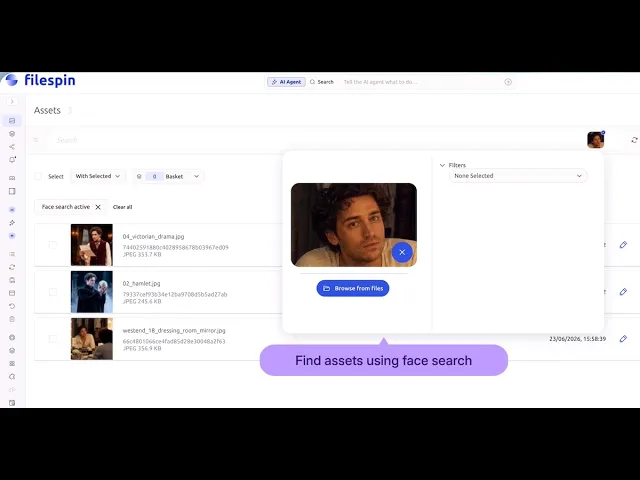
FileSpin’s Face Recognition & Search add-on fixes this. As your photos upload, it automatically detects and groups faces in the background.
Want to find someone? Simply search with their face. You don’t need to know their name, and nobody has to manually tag anything. FileSpin instantly pulls up every photo they appear in across your library. Because this happens automatically during the upload process, the search is ready to go the second an editor opens the folder.
Privacy on your terms
Facial recognition is sensitive data, and treating it like standard metadata is a quick way to create a compliance nightmare. FileSpin lets you control exactly how and when scanning happens:
⚬ Scan by permission: Only allow face scanning on photos that have the right tag—like a consent flag, release form, or approved collection. If a photo doesn’t have the tag, it behaves like a normal photo and is never scanned.
⚬ Scan on your schedule: Tell the system to wait until an asset is marked “approved” before it looks for faces, ensuring nothing is indexed before it’s legally cleared.
⚬ No memory required: These rules are baked right into the metadata tags your team already uses. It takes the burden of compliance off your employees’ memories and puts it directly into the automated pipeline.
Where this actually saves the day
When you’re dealing with massive volume, this is a lifesaver. Take Cannes Lions: they use FileSpin to manage over 2 million assets uploaded from 80+ countries, with stage content needing to reach remote attendees the same day. At that scale, you can’t rely on someone remembering which memory card a specific speaker is on.
But the exact same headache happens in smaller teams, too. Whether you’re dealing with conference photography, e-commerce shoots with recurring models, or years of company retreat photos, the manual approach just gets slower every year.
Where to start
Face Recognition & Search is available as an add-on for Scale and Enterprise plans. If you’re shopping around for a feature like this, ask any vendor these three questions:
⚬ Can I search for a person without having to manually tag every photo first?
⚬ Can I control exactly which photos get scanned for faces using my own metadata, rather than a risky global on/off switch?
⚬ Does the scanning run automatically, or does my team have to remember to click a button?
If the answer to any of those is no, the tool is going to create more work for you, not less. The best way to test ours is with a real shoot: upload a single event, flag the assets you have clearance to index, and see how fast you can find every photo of one person.