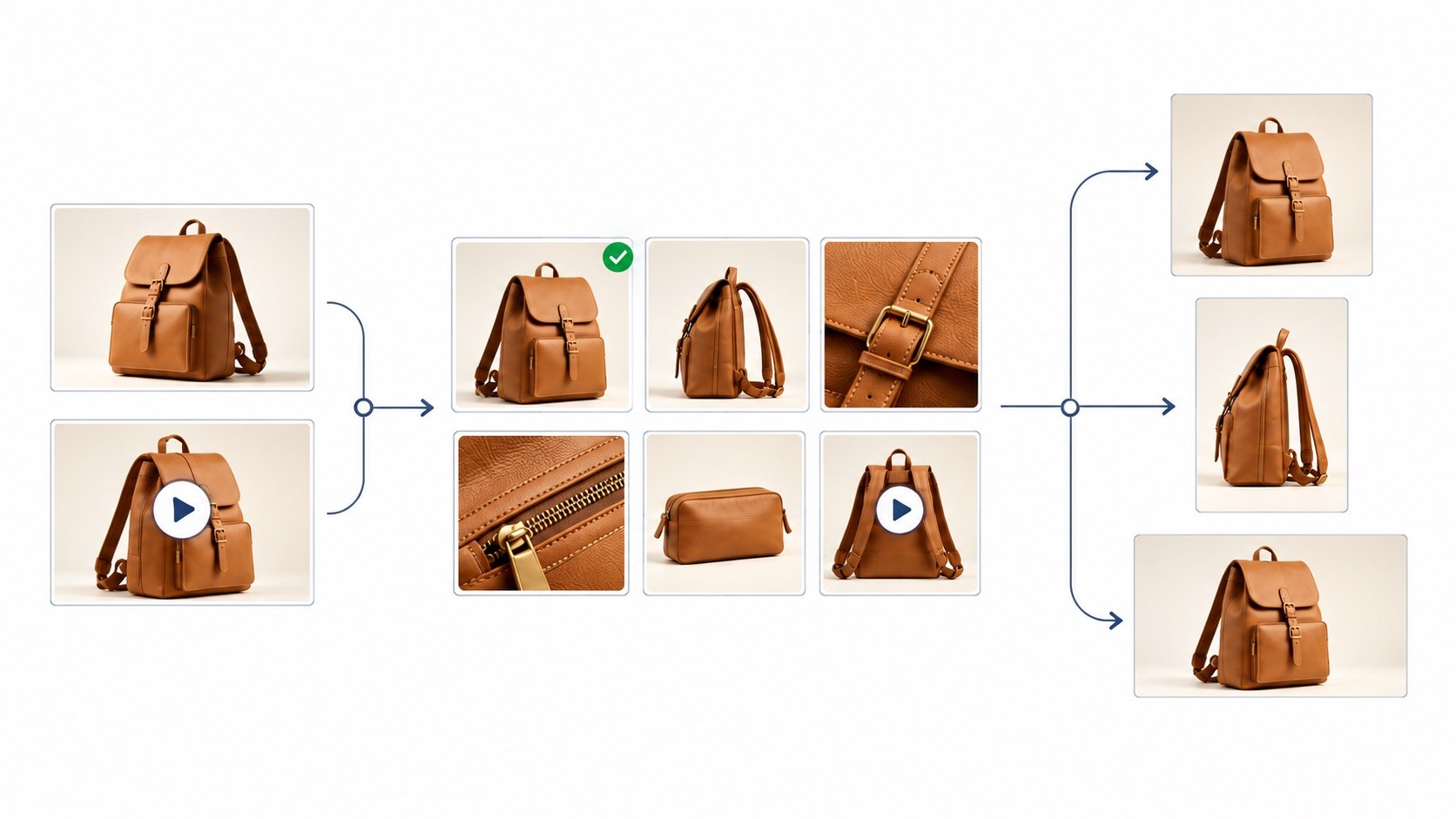
Digital asset management (DAM) is the practice of organising, finding, controlling and distributing digital files. A DAM system is software that brings assets such as images, videos, logos and documents into a shared library, along with the information people need to use them correctly.
Think about the last campaign image your team published.
Someone found the file. Someone checked whether it was the latest version. Someone else approved it. Then came the square crop, the website banner, the smaller file for email and the message asking where to download everything.
Each step sounds small. Together, they can turn publishing one asset into a chain of requests.
A DAM helps connect that work, from the moment a file enters your library to the moment it reaches its audience.
One asset. So many handoffs. Watch how organising, reviewing, preparing and delivering media fit together.
What does a DAM actually manage?
A digital asset is a file that has value to your organisation: a product photograph, launch video, logo, sales presentation or brochure, for example.
Using that file usually requires more information than its filename provides. Which product does it show? Which campaign does it belong to? Who can use it? Has it been approved for the intended purpose?
That information is called metadata. It gives a file context and makes it easier to find.
For example, IMG_4821.jpg tells a colleague very little. Add a product name, campaign, colour and asset type, and they can search for “summer collection” or filter for product photographs without knowing the filename.
FileSpin’s DAM basics guide describes an asset as its content together with its metadata. That content can include the original file and derived versions, such as image conversions or video transcodes.
How does digital asset management work? Follow one campaign
Imagine a team launching a new bag collection. It has product photographs, a campaign image and a short launch video. The website, email team, social team and retail partners all need to use them.
This is an illustrative workflow. The order can vary: some teams review a source image first, while others also approve its final channel-specific crops.
1. Upload the files to a shared library
The team brings its source photographs and video into one agreed location.
That gives the next person a dependable starting point. They can locate the campaign’s assets without reconstructing a trail of email attachments and personal folders.
A central library still needs an owner. Decide who uploads files, who maintains their information and who can change or remove them. Those responsibilities help keep the library useful as it grows.
2. Organise, tag and find the right asset
The team adds information that matches how colleagues work: product name, campaign, market and asset type.
A marketer looking for the bag’s hero image can search or filter by those details. They do not have to remember who created it or which folder received the final export.
Some DAM systems can suggest tags using AI. That can reduce repetitive work, but teams still need to check the suggestions and supply business context, such as which campaign an image belongs to.
Start with a few fields people will maintain consistently. For this campaign, a product identifier and campaign name may be more useful than dozens of loosely applied tags.
3. Share assets for review and approval
Finding the image answers one question. Knowing whether it is ready to use answers another.
In FileSpin, review and approval happen through a share. You create the share, add assets, choose the appropriate share type and options, and assign a reviewer. The reviewer can review and approve the assets, so the team can identify which assets have approval.
For the bag launch, the campaign owner could bring the photographs and video into a share for review before handing them to the teams preparing the campaign.
Be clear about what approval covers. Approving the source photograph does not necessarily mean every later edit or crop is approved. Agree when a change needs another review.
Across DAM products, review features vary. Some are built in; others depend on integrations. During an evaluation, ask to see how a reviewer receives an asset, approves it and makes that decision visible to the people using it.
4. Prepare images and videos for each destination
The website needs a product thumbnail. Email needs a wide banner. A partner needs a downloadable image in a specified format.
A DAM with media-processing capabilities can generate those outputs from a source asset. Depending on the system, it can prepare versions in advance or transform an image when a particular size or format is requested.
FileSpin supports on-demand image transformations, including resizing, cropping and format changes. Your team can request a suitable output from an existing asset instead of manually exporting every variation.
Video requires its own preparation. Transcoding converts a video into versions suited to different playback needs. Adaptive streaming can switch between quality levels as viewing conditions change. These capabilities are described in FileSpin’s video transcoding and streaming guide.
It helps to distinguish a creative revision from a technical variation. Changing the campaign message creates a new revision. Producing a smaller image from the same approved source creates another output. Treating both as unrelated files makes the library harder to understand.
5. Share with people and deliver to channels
Different destinations need different ways to access media.
A retail partner may need a selected collection. An agency may need source files. A website may need an optimised image delivered directly to a page.
DAM distribution can include shares, download links, portals and connections to other applications. The available options depend on the platform and its configuration.
This is where the earlier work pays off: the recipient gets the relevant assets, with the access and format needed for the job.
6. Keep the library useful after launch
After publication, someone still needs to maintain the assets.
Which images remain current? Which campaign materials should be retired? Can the team reuse a photograph for the next launch, and are its usage rights still appropriate?
A library stays useful when people maintain that context. Assigning ownership for it helps prevent old and current material from becoming indistinguishable.
What changes when this works well?
For a marketing or content operations team, the benefits show up in everyday tasks:
Less searching: people can locate assets using information they recognise.
Clearer handoffs: reviewers and publishers can identify what is ready for the next step.
Less repeated preparation: the same source can supply multiple image or video outputs.
Easier reuse: existing work remains discoverable for future campaigns.
More consistent distribution: teams have an agreed place to obtain the assets they need.
You can measure these improvements without starting with a complicated return-on-investment model. Record how long it takes to find an approved image, prepare a set of outputs or fulfil a partner’s request. Then compare the same tasks after the workflow changes.
DAM vs cloud storage vs a CMS
These tools often work together, but their main jobs differ.
Cloud storage gives people a place to store, sync and share files. A well-organised shared drive may be enough for a team with straightforward requirements.
A DAM focuses on a reusable asset library and the context around it: finding media, managing access, supporting its lifecycle and making it available for use.
A content management system (CMS) manages content such as website pages. It can use images and videos supplied by a DAM while controlling the page’s text, layout and publication.
Features overlap. Cloud storage can include search and version history, and a CMS can include a media library. The useful question is whether your current tools support the work your team repeatedly needs to do.
For the bag launch, cloud storage might hold working documents, the DAM might manage product media, and the CMS might publish the collection page.
When does your team need a DAM?
The number of files is only part of the decision. A modest library used by several teams across many channels can involve more coordination than a large archive that rarely changes.
Look for recurring patterns:
People depend on one colleague to find the right files.
Teams repeatedly ask which version is approved.
Resizing and conversion requests return every week.
Partners need the same assets sent again and again.
Usage information is difficult to check.
Several applications require separate manual uploads.
If these problems are occasional, better naming conventions and clearer ownership may be enough. If they regularly delay work, a DAM is worth evaluating.
Try this with your next campaign: choose one image and record every step between creation and publication. Note each person involved, each tool used and each repeated task. That gives you a practical starting point for deciding what needs to change.
Where does headless DAM fit?
A headless DAM makes asset-management capabilities available through APIs, so other applications can work with the library.
For example, a website can request media from the DAM, or an internal application can let staff search for assets inside their usual workspace.
“Headless” describes the separation between the underlying service and the interfaces using it. A platform can support headless integrations and still provide a dashboard for people.
For more detail, read FileSpin’s guide to headless DAM.
Evaluate a DAM with your own workflow
Bring representative files to a demonstration: one campaign image, one video and a list of the destinations they need to reach.
Ask the vendor to show how someone finds the files, how review and approval work, how the required outputs are prepared, and how people or applications receive them. Check which steps need additional products, integrations or development.
FileSpin combines asset organisation and search with share-based review and approval, image transformations, video processing and delivery. Its APIs and integrations let teams connect that work to their existing applications.
The most useful demonstration follows the work your team actually does. Book a FileSpin demo and bring a campaign workflow you would like to improve.
Frequently asked questions
What does DAM stand for?
DAM stands for digital asset management. It refers both to the practice of managing digital assets and to software that supports that work.
Can a DAM manage video as well as images?
Many can. Check whether a platform only stores video files or also supports previews, transcoding and streaming. Those are different capabilities.
Does every DAM include approval workflows and automatic resizing?
No. Some platforms provide them directly, while others rely on integrations or additional services. Ask to see the complete workflow before choosing a system.
Does a DAM replace your creative tools?
Usually, teams continue using their design and editing tools. The DAM helps organise, find, review and distribute the resulting assets, with integrations varying by product.


